PeakCyber Technologies

wp2shell: From WordPress to Server Shell

wp2shell attack chain from WordPress REST batch route confusion to remote code execution

Today, the infrastructure of many websites on the internet relies on the same engine: WordPress.

Originally emerging as a simple blogging platform, this structure has evolved into a massive Content Management System (CMS) that powers millions of websites, from e-commerce giants to news agencies.

While this massive market share makes WordPress a significant part of the digital ecosystem, it also makes it one of the most lucrative targets for attackers in the digital world.

Although vulnerabilities often stem from third-party plugins or weak configurations, a security flaw emerging directly within the WordPress Core shakes the entire internet: wp2shell.

Unauthorized Access in Default Installations

Announced on July 17, 2026, the vulnerability chain dubbed “wp2shell”became one of the most disruptive security flaws on the internet. Recognized as one of the most critical vulnerabilities of recent years, “wp2shell” allows an attacker to compromise a completely default WordPress installation at the Remote Code Execution (RCE) level, without requiring any third-party plugins or misconfigurations.

This threat does not arise from a single flaw, but from the devastating combination of two critical vulnerabilities in the core:

  • A route confusion vulnerability in the REST API /wp-json/batch/v1endpoint (CVE-2026–63030)
  • An SQL Injection within WP_Query (CVE-2026–60137)

By chaining these vulnerabilities, attackers can execute commands directly on the target server (RCE) via an unauthorized and anonymous HTTP request.

Consequently, attackers can drop a web shell onto the server within seconds, exfiltrate the entire database, turn the server into a botnet node, or use it as a pivot point to infiltrate the organization’s internal network.

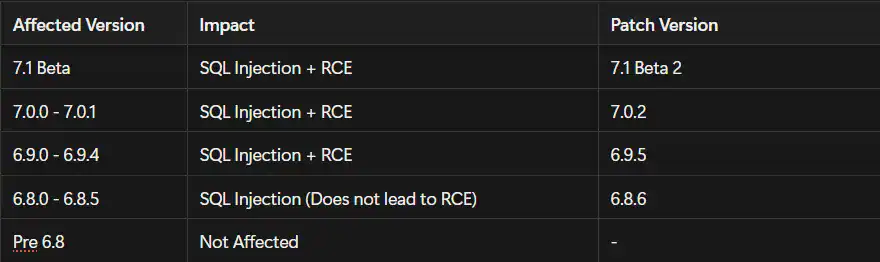
Affected Versions

wp2shell: From WordPress to Server Shell

Code Analysis

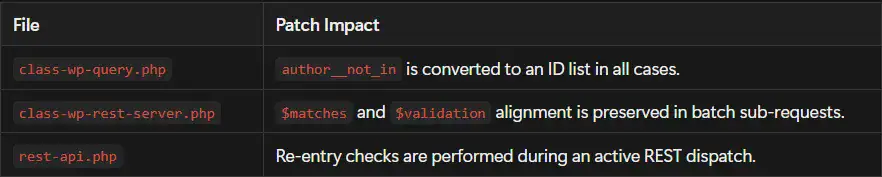
When comparing WordPress versions 7.0.1 and 7.0.2, it is evident that security updates were made in three critical files regarding the wp2shell attack chain:

  • src/wp-includes/class-wp-query.php
  • src/wp-includes/rest-api/class-wp-rest-server.php
  • src/wp-includes/rest-api.php

These modifications were implemented to secure inputs reaching the SQL query, prevent index shifting in REST batch requests, and block the initiation of a second REST loop during an active REST dispatch.

Let’s examine the significant changes in these files sequentially:

1-) class-wp-query.php

The way the author__not_in parameter is utilized in the SQL query was modified in this file.

Old Code

if ( ! empty( $query_vars['author__not_in'] ) ) {
if ( is_array( $query_vars['author__not_in'] ) ) {
$query_vars['author__not_in'] = array_unique(
array_map( 'absint', $query_vars['author__not_in'] )
);

sort( $query_vars['author__not_in'] );
}

$author__not_in = implode(
',',
(array) $query_vars['author__not_in']
);

$where .= " AND {$wpdb->posts}.post_author NOT IN ($author__not_in) ";
}

In the old code, the input was sanitized with absint() only if it was an array. If a non-array value was provided, this check was bypassed, but the data was still appended to the NOT IN (...) clause in the SQL query.

New Code

if ( ! empty( $query_vars['author__not_in'] ) ) {
$author__not_in_id_list = wp_parse_id_list(
$query_vars['author__not_in']
);

if ( count( $author__not_in_id_list ) > 0 ) {
sort( $author__not_in_id_list );

$where .= sprintf(
" AND {$wpdb->posts}.post_author NOT IN (%s) ",
implode( ',', $author__not_in_id_list )
);

$query_vars['author__not_in'] = $author__not_in_id_list;
}
}

In the new code, regardless of the input type, it is first passed through the wp_parse_id_list() function and converted into an integer ID list.

Security Impact

This change prevents non-array inputs from bypassing the sanitization check and reaching the SQL query.

2-) class-wp-rest-server.php

This file was updated to preserve the order of the arrays used when processing REST batch requests.

Old Code

foreach ( $requests as $single_request ) {
if ( is_wp_error( $single_request ) ) {
$has_error = true;
$validation[] = $single_request;
continue;
}
}

In the old code, a faulty sub-request was only added to the $validation array. Because a corresponding element was not added to the $matches array, the indexes of subsequent requests could shift.

New Code

foreach ( $requests as $single_request ) {
if ( is_wp_error( $single_request ) ) {
$has_error = true;
$matches[] = $single_request;
$validation[] = $single_request;
continue;
}
}

In the new code, the faulty single request is also added to the $matches array, ensuring both arrays remain in the same order.

Security Impact

This modification prevents a sub-request from mixing with the route match or validation context of another request.

3-) rest-api.php

This file was updated to prevent a second REST processing loop from being initiated while an active REST request is already being processed.

Old Code

function rest_api_loaded() {
if ( empty( $GLOBALS['wp']->query_vars['rest_route'] ) ) {
return;
}

// Other checks...

$server = rest_get_server();
$server->serve_request( $route );

die();
}

In the older version, the rest_api_loaded() function proceeded without checking if another REST dispatch was currently running.

New Code

if (
isset( $GLOBALS['wp_rest_server'] )
&& $GLOBALS['wp_rest_server'] instanceof WP_REST_Server
&& $GLOBALS['wp_rest_server']->is_dispatching()
) {
return;
}

An active REST dispatch check was added in the new version.

Security Impact

If another REST process is already underway, the function exits early. This prevents nested REST operations and the corruption of the current REST state.

General Conclusion of the Patch

The WordPress 7.0.2 update fortifies three distinct points in the “wp2shell” chain:

  • Inputs reaching the SQL query are normalized.
  • Index shifting of batch sub-requests is prevented.
  • Re-entry during an active REST operation is blocked.

When all these changes are combined, the execution of the attack chain is completely thwarted.

Theory to Practice: wp2shell Applied PoC

Shortly after its announcement, public PoCs and exploit examples for wp2shell began surfacing on the internet. Sources like Tenable, VulnCheck, BleepingComputer, and Elastic reported the proliferation of PoCs and observed active exploitation in certain environments.

The primary goal on the PoC side is to demonstrate that the vulnerability does not arise from a single flaw, but from chaining several behaviors within the WordPress Core. Therefore, explaining it merely as “a request was sent to an endpoint and a shell was obtained” falls short. To truly understand wp2shell, REST batch processing, route/validation alignment, WP_Queryparameter conversion, object cache, and customizer flow must be analyzed together.

Lab Topology

When demonstrating the PoC, proceeding with two separate WordPress installations is the most comprehensible method.

wp2shell: From WordPress to Server Shell

Default WordPress installations are used on both systems. No plugins or custom themes are required. This proves that the behavior originates from Core components, not third-party code.

Main surfaces analyzed in the PoC flow:

/wp-json/
/?rest_route=/
/wp-json/batch/v1
/?rest_route=/batch/v1
WP_REST_Server::serve_batch_request_v1()
WP_Query
oEmbed cache
customize_changeset

Stage 1: Verification of WordPress and REST Batch Surface

The first step is to determine if the target is indeed WordPress and if the REST batch route is externally visible.

Expected findings at this stage:

Traces of wp-content or wp-includes on the homepage.
WordPress namespaces within the REST index.
/batch/v1 registration within the REST routes object.
A meaningful HTTP response to an `OPTIONS` request sent to the batch endpoint.

This phase does not prove the vulnerability exists yet. It merely shows the attack surface is present because patched WordPress versions also display the REST API and batch route.

Sample Discovery Output Format for the Report:

[+] Target: https://example.test
[+] WordPress markers detected: wp-content, wp-includes
[+] REST API index reachable: /wp-json/
[+] REST batch route visible: /batch/v1
[+] Detected WordPress version: 7.0.1
[!] Version is inside wp2shell RCE chain range

This output does not mean a successful exploit. It merely indicates an elevated risk based on version and endpoint visibility.

Stage 2: Sub-request Logic within the Batch

The purpose of the REST batch endpoint is to process multiple sub-requests within a single HTTP request. WordPress generates a route match and a validation result for each sub-request during this process.

Normally, the internal flow should proceed as follows:

request[0] -> match[0] -> validation[0] -> dispatch[0]
request[1] -> match[1] -> validation[1] -> dispatch[1]
request[2] -> match[2] -> validation[2] -> dispatch[2]

The critical problem in the vulnerable version is that these arrays do not stay aligned when a faulty sub-request occurs. When a sub-request generates an error, a corresponding entry is created on the validation side, but the same index might not be preserved on the matches side. This is the point where the subsequent request can be executed with the wrong route/validation context.

Abstract flow demonstrating the route confusion logic:

Batch content:

request[0] = Special sub-request designed to generate an error
request[1] = A route that normally expects strict validation

Vulnerable internal state:

validation[0] = request[0] error result
validation[1] = request[1] validation result

matches[0] = request[1] route match

Result:

request[1] can be processed within a shifted REST state instead of its own validation/match context.

The crucial element in this section is not the raw HTTP body, but the alignment problem occurring within WordPress’s batch arrays. The patch in WordPress 7.0.2 closes this shift by adding the faulty sub-request to both the $validation and $matches arrays.

Stage 3: Transition to WP_Query After Validation Bypass

Route confusion alone is not RCE. The second critical point of the chain is the combination of this confusion with the handling of author__not_in inside WP_Query .

The REST API normally coerces external parameters into their expected types. For instance, parameters like author exclusion should be handled as a list of integers. However, when this normal validation pipeline weakens due to route confusion, unexpected data can reach into WP_Query .

Vulnerable code behavior:

 If author__not_in is an array:
Cleaned with absint()

If author__not_in is NOT an array:
The cleaning block is skipped, value is directly injected into the NOT IN
(...) clause.

This creates the SQL injection boundary. The fundamental flaw here is the “only sanitize if it’s an array” approach. The post-patch approach normalizes the input with wp_parse_id_list() regardless of its type.

Explaining the SQLi boundary via code:

if ( ! empty( $query_vars['author__not_in'] ) ) {
if ( is_array( $query_vars['author__not_in'] ) ) {
$query_vars['author__not_in'] = array_unique(
array_map( 'absint', $query_vars['author__not_in'] )
);
}

$author__not_in = implode(
',',
(array) $query_vars['author__not_in']
);

$where .= " AND {$wpdb->posts}.post_author NOT IN ($author__not_in) ";
}

The problem here begins before the SQL statement itself. The code assumes the variable has been converted to an integer list in all scenarios. However, when a non-array value arrives, this assumption breaks.

Stage 4: Connecting the SQL Injection to the WordPress Object Flow

This is what distinguishes wp2shell from a generic SQL injection. In public PoC analyses, the SQL injection is used not merely to extract data, but to manipulate WordPress’s own object handling logic.

Prominent components in this part of the chain:

WP_Post objects
request-local object cache
oEmbed cache records
customize_changeset post type
current user and capability checks

In many operations, WordPress processes the result returned from the database not just as a “row”, but as a meaningful content object within the application. Therefore, results manipulated via SQLi can affect post, cache, or customizer flows in subsequent stages.

Stage 5: oEmbed Cache and customize_changeset Connection

The oEmbed cache mechanism generates intermediary records that WordPress uses for embedding external content. customize_changeset, on the other hand, is a specific post type where changes on the customizer side are kept temporarily/scheduled.

These two structures are vital in the PoC chain because, in certain operations, WordPress exhibits different capability checks and user context behaviors depending on the type and context of the post object. Public technical analyses detail how the chain can approach admin privileges at this point and subsequently escalate to RCE using administrative capabilities.

How to document this phase in the report:

SQLi -> Creation of a fake/unexpected post object effect
Post object -> Contact with the cache/customizer flow
Customizer flow -> Approaching a highly privileged user context
Admin context -> RCE via standard WordPress management functions

Stage 6: Escalation from Admin Privileges to RCE

In WordPress, obtaining admin privileges rarely requires a separate kernel or system vulnerability to achieve RCE. Even standard features in the admin panel can lead to PHP code execution on the server.

Example RCE paths:

Plugin installation
Theme file editing
Uploading a plugin package containing malicious PHP
Dropping an executable file under the webroot

Thus, the term “RCE” in the wp2shell chain refers to the practical outcome following the acquisition of admin privileges in most analyses. The critical breaking point is the ability to reach WordPress admin capabilities starting from an unauthenticated state.

Stage 7: Where the Chain Breaks Post-Patch

In patched versions, the chain breaks not at one, but at several points:

wp2shell: From WordPress to Server Shell

For this reason, 7.0.2 doesn’t just fix the SQLi line. It simultaneously limits the route confusion and nested REST dispatch risks.

Patched vs. unpatched version comparison:

WordPress 7.0.1

The REST batch route is reachable.
Route/validation alignment can be corrupted following a faulty sub-request.
The author__not_in type is not normalized in every case.
The exploit chain can progress to the SQLi and admin/RCE stages.


WordPress 7.0.2

The REST batch route is reachable.
A faulty sub-request is maintained in the same order within both the matches and validation arrays.
author__not_in is normalized using wp_parse_id_list().
Re-entry is checked during an active REST dispatch.
The exploit chain is broken at critical stages.

Stage 8: Expected Artifacts After PoC

In a successfully exploited system, looking solely at the HTTP response is insufficient. Traces left behind after a PoC or actual attack generally span across multiple layers.

Areas to inspect:

Web access logs
Web error logs
WordPress user table
wp_usermeta capability records
oembed_cache records within wp_posts
customize_changeset records within wp_posts
New files under wp-content/plugins
Modifications under wp-content/themes
PHP/PHTML/PHAR files under wp-content/uploads

A strong PoC write-up explains why these artifacts might occur, rather than simply stating “the request was successful.” Because in real-world incident response, understanding the attack usually involves connecting these exact artifacts.

Sample PoC assessment output:

Target version: WordPress 7.0.1
REST batch route: reachable
Route confusion patch: missing
author__not_in normalization patch: missing
REST re-entry patch: missing

Assessment:
The target version falls into the wp2shell RCE chain range.
The REST batch surface is externally reachable.
Patch diff confirms that the vulnerable code paths are present.
Incident review should focus on REST batch traffic, oEmbed cache entries,
customize_changeset activity, new admin users, and unexpected PHP files.

Detection and Hunting

Surfaces to search in access logs:

POST /wp-json/batch/v1
POST /?rest_route=/batch/v1
rest_route=/batch/v1
/wp-json/batch

However, access logs alone may not be sufficient. The critical part of the exploit chain is often carried within the HTTP POST body, which standard access logs do not record.

Suspicious records to check in the database:

SELECT ID, post_type, post_status, post_parent, post_date, post_modified_gmt, post_name
FROM wp_posts
WHERE post_type IN ('oembed_cache', 'customize_changeset')
AND post_date >= '2026-07-17'
ORDER BY ID DESC;
SELECT ID, user_login, user_email, user_registered
FROM wp_users
WHERE user_registered >= '2026-07-17'
ORDER BY user_registered DESC;
SELECT user_id, meta_key, meta_value
FROM wp_usermeta
WHERE meta_key IN ('wp_capabilities', 'wp_user_level')
ORDER BY user_id;

Areas to inspect on the file system:

find wp-content/plugins -type f -mtime -10 -print
find wp-content/themes -type f -mtime -10 -print
find wp-content/uploads -type f \( -name '*.php' -o -name '*.phtml' -o -name '*.phar' \) -print

The following findings should be considered highly critical:

  • An unexpected new admin user
  • An executable PHP file under wp-content/uploads
  • A new or suspicious plugin folder
  • Unexpected modifications in the theme files
  • Code containing obfuscation inside functions.php
  • Intense POST traffic to the batch endpoint prior to patching

Temporary Mitigation: Restricting REST Batch to Authenticated Users Only

The permanent solution is to update the WordPress Core. However, if patching cannot be performed immediately, the REST batch endpoint can be restricted from anonymous users.

1-) WordPress mu-plugin example: Blocking anonymous REST batch usage

This code can be deployed as wp-content/mu-plugins/disable-unauthenticated-rest-batch.php. If the mu-plugins folder does not exist, it should be created.

<?php
/**
* Plugin Name: Disable Unauthenticated REST Batch API
* Description: Requires an authenticated WordPress user for REST batch requests.
* Version: 1.0.0
* Requires at least: 5.6
* License: GPL-2.0-or-later
*/


defined( 'ABSPATH' ) || exit;

/**
* Reject anonymous requests to the core REST batch endpoint.
*
*@parammixed $result Pre-calculated dispatch result.
*@paramWP_REST_Server $server REST server instance.
*@paramWP_REST_Request $request Current REST request.
*@return mixed|WP_Error
*/

function wporg_require_authentication_for_rest_batch( $result, $server, $request ) {
if ( '/batch/v1' !== strtolower( untrailingslashit( $request->get_route() ) ) || is_user_logged_in() ) {
return $result;
}

return new WP_Error(
'rest_batch_authentication_required',
'Authentication is required to use the batch API.',
array( 'status' => 401 )
);
}

add_filter( 'rest_pre_dispatch', 'wporg_require_authentication_for_rest_batch', -1000, 3 );

What this code does is straightforward. If the request hits the /batch/v1route and the user is not logged in, it returns a 401 Unauthorized. If the user is logged in or the request does not belong to the batch endpoint, WordPress continues its normal flow.

2-) Nginx example: Temporarily blocking the batch endpoint

location = /wp-json/batch/v1 {
return 403;
}

if ($arg_rest_route = "/batch/v1") {
return 403;
}

3-) Apache example: Temporarily blocking the batch endpoint

RewriteEngine On
RewriteCond %{REQUEST_URI} ^/wp-json/batch/v1 [OR]
RewriteCond %{QUERY_STRING} (^|&)rest_route=/batch/v1(&|$)
RewriteRule ^ - [F]

These types of blocks might affect certain integrations. WooCommerce, headless frontends, the block editor, mobile applications, or custom automations might be utilizing the REST batch API. Therefore, production impact should be carefully verified before applying WAF or web server rules.

Conclusion

The wp2shell (CVE-2026–63030 & CVE-2026–60137) vulnerability chainserves as a bitter reminder of how fragile even “default” configurations can be in modern web security.

Without relying on third-party plugins, custom themes, or complex misconfigurations, the masterful chaining of two distinct flaws occurring directly within the WordPress Core (REST API route confusion and WP_Query SQL Injection) can transform an anonymous attacker into a server administrator in a matter of seconds.

While the temporary hardening steps we discussed throughout this article (WAF rules or mu-plugin integrations) buy critical time for system administrators, the ultimate solution is to urgently upgrade systems to versions 7.0.2 or 6.9.5.

It must not be forgotten that in the digital world, security is not a static state, but a continuous race of reactions. Proactively monitoring server logs against potential breaches, detecting anomalies, and ensuring timely patch management are the only ways to stay upright in this race.

Contributors:

PeakCyber cybersecurity and offensive security services logo.

Subscribe to our cyber security newsletter

Scroll to top