PeakCyber Technologies

EF Core Smart Query Splitting Interceptor

EF Core Smart Query Splitting Interceptor

One of the most common dilemmas when developing with Entity Framework Core (EF Core) is deciding whether to use Single Query or Split Query when fetching related data via Include / ThenInclude.

Recently, we hit a serious performance bottleneck in our project around exactly this point. In this post, I’ll walk through the SmartSplitQueryInterceptor solution we built — going beyond EF Core’s default capabilities to fit our own dynamics — what problems it solved, how much it improved things, and what we ran into along the way.

The Problem: Cartesian Explosion vs. Network Cost

When fetching complex entities with many Include calls from the database, we had two options:

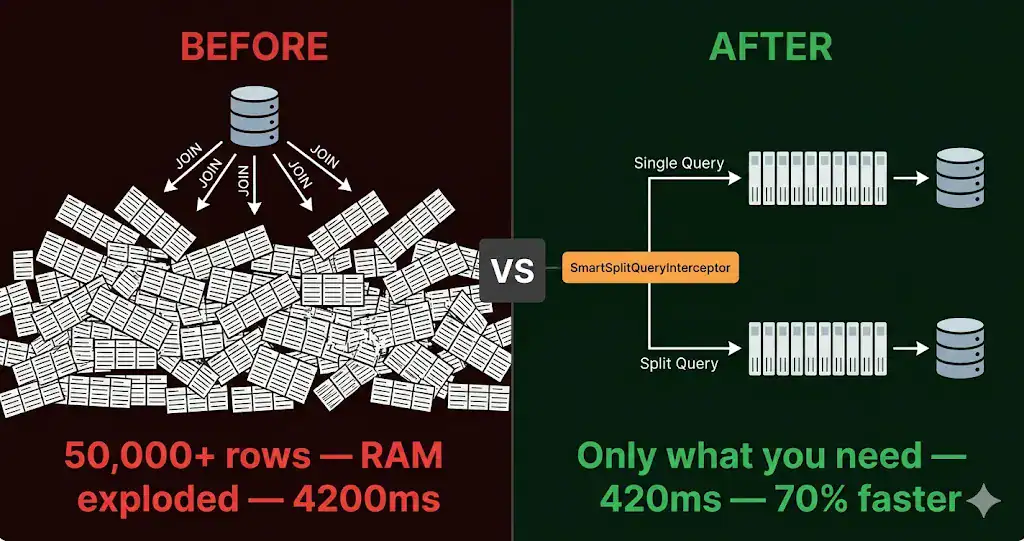
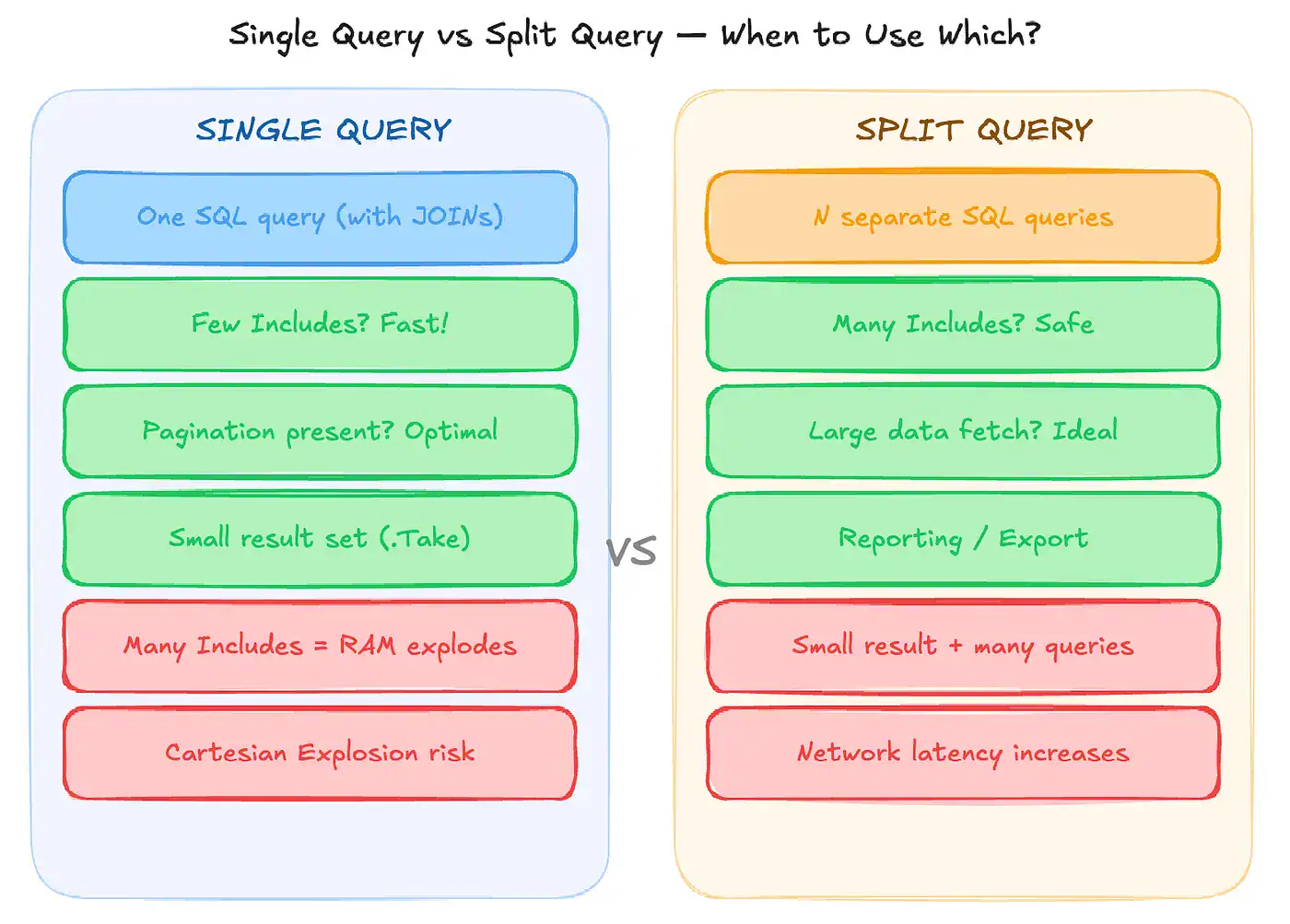
Single Query (default): EF Core joins all tables with LEFT JOIN. When related collections are involved, data multiplies exponentially. This is known as Cartesian Explosion. It blows up RAM usage and puts serious strain on the database.

Split Query (.AsSplitQuery()): EF Core fires a separate SELECT query for each Include. It solves the Cartesian explosion — but this time creates a network cost similar to the N+1 Problem.

EF Core Smart Query Splitting Interceptor

We initially decided to use Split Query for all our heavy queries. But after a while, we noticed response times were growing significantly on our paginated endpoints — lists returning between 10 and 100 records. Why? Because joining 15 different tables for 10 records (Single Query) is blazing fast, whereas firing 16 separate queries for those same 10 records (Split Query) was causing slowness due to network round-trip latency.

First Attempt: A Dynamic Interceptor and Navigation Count

We concluded that the decision couldn’t be static. EF Core needed to look at the query’s structure and decide for itself. To achieve this, we wrote an IQueryExpressionInterceptor to analyze the Expression Tree before the query was compiled.

Our initial logic was simple: count the number of Include calls in the query.

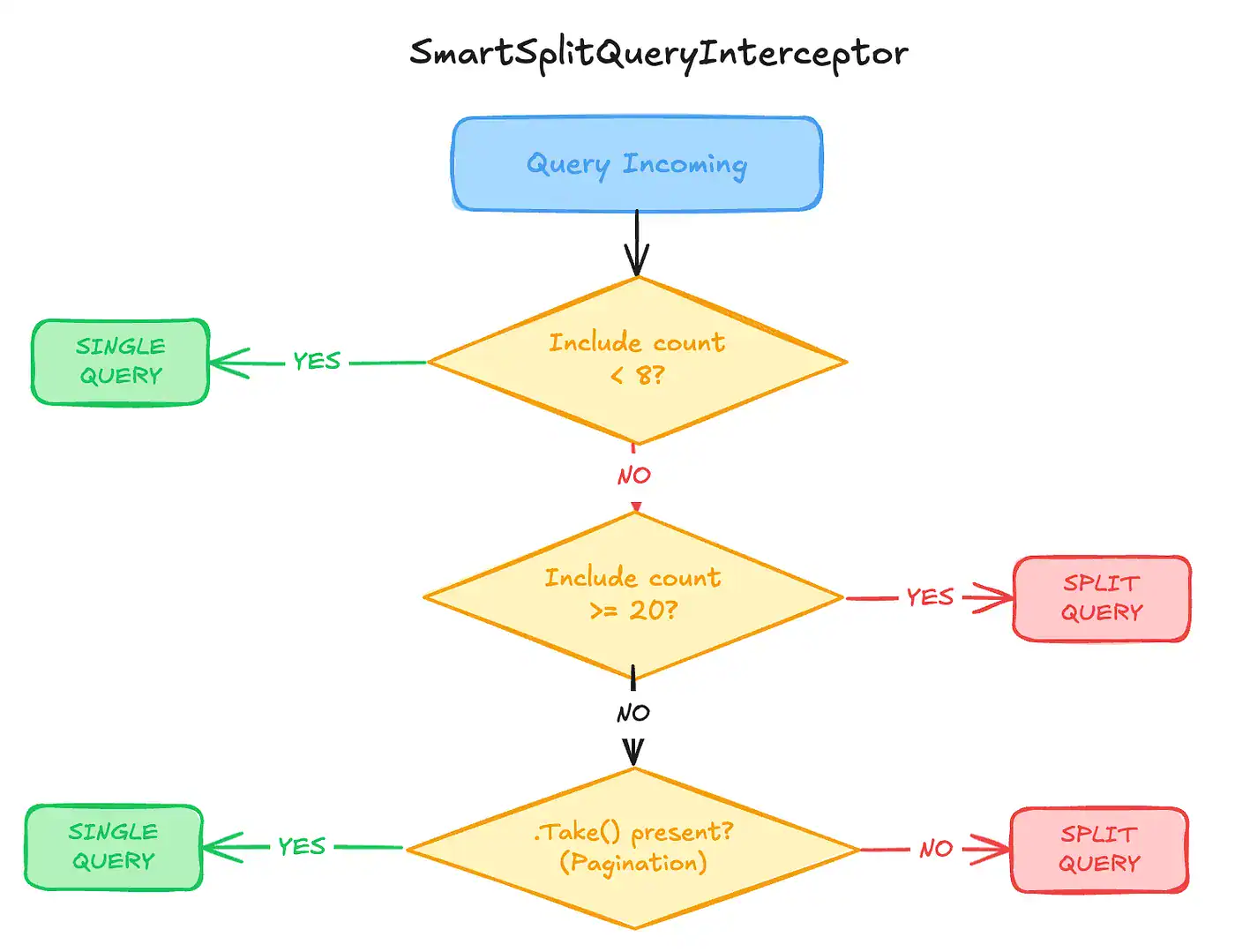
  • If there are fewer than 8 Includes → no risk, use Single Query (avoid network cost)
  • If there are more than 8 Includes → Cartesian risk, use Split Query

But this wasn’t a complete solution either. A query with 15 Include calls that only fetches 10 records via .Take(10) would still fall into Split Query — creating unnecessary network overhead.

The Real Challenge: Gridify and the Parametric .Take() Problem

We needed to add a “Limit” parameter to the decision mechanism. Specifically, we needed to find the .Take(limit) call inside the Expression Tree and decide based on the limit value: “If the limit is less than 100, don’t Split Query — even if the Include count is in the mid range.”

We quickly wrote a TakeLimitDetector (an Expression Visitor) and tried to read the integer value inside .Take(). But we ran into an unexpected obstacle: our project used the Gridify library for pagination and filtering.

Gridify’s ApplyPaging method doesn’t send the limit value as a plain constant (ConstantExpression). Instead, it sends it as parametric variables evaluated at runtime (closure field access). Since we were inspecting the Expression Tree before EF Core compiled the query, figuring out whether that variable held “10” or “100” at that exact moment required incredibly costly and complex reflection work.

The Final Solution: Just Check for .Take() Presence

When we saw how hard it was to read the value, we stopped and rethought the problem. Did we actually need the exact limit?

Given our project’s dynamics, if a query had a .Take() call, it always meant pagination was happening — and our page sizes were generally small (10, 20, 50, etc.).

Instead of forcing the Expression Tree to yield a value, we simplified our logic. We converted the TakeDetector class into a lightweight structure that only checks whether a .Take() call exists in the tree (bool HasTake):

private bool ShouldApplySplit(int navigationCount, bool hasTake)
{
// 1. Below the critical threshold — never split (low Cartesian risk)
if (navigationCount < _baseNavigationThreshold) // e.g. 8
return false;

// 2. Very high navigation count - split regardless of limit (serious Cartesian risk)
if (navigationCount >= _highNavThreshold) // e.g. 20
return true;

// 3. Middle threshold (8–19 Includes):
// If pagination (Take) IS present - don't split!
// (Small data, network cost > Cartesian cost)
if (hasTake)
return false;

// No pagination - split (fetching the whole table with 15 includes causes Cartesian explosion)
return true;
}

Results

EF Core Smart Query Splitting Interceptor

After deploying this smart interceptor, we achieved three concrete improvements:

Network cost dropped. Database strain and response times on our paginated listing endpoints improved by up to 70%. Small result sets that previously triggered 10–20 separate queries now arrive with a single optimal query.

Cartesian explosion prevented. For large data fetches without pagination — reporting, workflow processing, Excel exports (hasTake == false) — the system automatically protected itself and ran Split Query.

Zero extra developer effort. Our engineering team no longer needs to think “Should I put .AsSplitQuery() here, or keep it as Single Query?” The system analyzes the structure and makes the right call on its own.

Sometimes the best solution isn’t diving deep into the system and doing the hard thing — it’s reframing the problem and making elegant assumptions that fit your business rules. Being unable to read the value inside .Take()pushed us toward a solution that is just as effective, but far more performant.


 

PeakCyber cybersecurity and offensive security services logo.

Subscribe to our cyber security newsletter

Scroll to top